Tuesday, December 6, 2011

The Sexiest Way To Lose Weight


It has been known for many years that sex is good exercise, but until recently nobody had made a scientific study of the caloric expenditure of different sexual activities. 

Unless you lay there like a dead fish, sex can be a great work out, and not only sex, but everything leading up to it and after as well. So everyone out there complaining about being fat, just start going off in the bedroom after you eat your 7 cheeseburgers and you will burn those calories right off, you have no excuses anymore. 

Below is the complete breakdown of everything done before, during, and after sex, and the calories you burn while doing it. Now after original and proprietary research they are proud to present the results. Sexual Calorie Counter

REMOVING HER CLOTHES: 
With her consent......................................................... 12 Calories 
Without her consent................................................... 187 Calories 

OPENING HER BRA: 
With both hands............................................................. 8 Calories 
With one hand.............................................................. 12 Calories 
With your teeth............................................................. 85 Calories 

PUTTING ON A CONDOM: 
With an erection............................................................. 6 Calories 
Without an erection..................................................... 315 Calories 

PRELIMINARIES: 
Trying to find the clitoris.................................................. 8 Calories 
Trying to find the G-Spot................................................ 92 Calories 

POSITIONS: 
Missionary................................................................... 12 Calories 
69 lying down............................................................... 78 Calories 
69 standing up............................................................ 112 Calories 
Wheelbarrow.............................................................. 216 Calories 
Doggy Style................................................................. 326 Calories 
Italian chandelier......................................................... 912 Calories 

ORGASMIC: 
Real........................................................................... 112 Calories 
False.......................................................................... 315 Calories 

POST ORGASM: 
Lying in bed hugging...................................................... 18 Calories 
Getting up immediately................................................... 36 Calories 
Explaining why you got out of bed immediately............. 816 Calories 

GETTING A SECOND ERECTION: If you are: 
20-29 years old........................................................... 36 Calories 
30-39 years................................................................. 80 Calories 
40-49 years............................................................... 124 Calories 
50-59 years............................................................... 972 Calories 
60-69 years............................................................. 2916 Calories 
70 and over.............................................. Results are still pending 

DRESSING UP AFTERWARDS: 
Calmly........................................................................ 32 Calories 
In a hurry..................................................................... 98 Calories 
With her father knocking at the door.......................... 1218 Calories 
With your wife knocking at the door.......................... 3521 Calories


I still skeptical about all these data actually. Hohohohoooohooo...


Source from Zoo Patrol

Labels: , , , , , , , , , , , , , ,

Friday, April 15, 2011

Blackberry Shortcut Keyboard

https://blogger.googleusercontent.com/img/b/R29vZ2xl/AVvXsEgOJnJKImiaMp3BgM0LNokzeMH7GjrV-JRp11-XYT12rn1xdSk14tPDE_7yu_hI2qXrEX8rVfrHb7uQ_AjaxqPHYJOyYvDrmAqdvJbeUOBQw2eU4jqadh-5lKLCvG8mOUsLvP24ZOsKCBYK/s1600/rim-blackberry-logo-1.jpg

Ya, bulan April biasa kita kenal april mop/april fool, dimana semua orang ngeselin semua dan melakukan trik tipuan dengan segala cara baik dari sms, telepon, sampe broadcast blackberry messenger.Barusan dapat BM "Lucu-lucu tampilannya tekan menu bb (2x) pada home screen lalu tekan alt+THMN. Indahnya berbagi!". Awalnya gw ga ketipu karena gw pake OS 6 pas tekan menu bb (2x) pada homescreen itu open tray bukan untuk akses menu theme. Gara2 kepo gw coba di bb ade gw OS 5.. Jreng! themenya jadi hitam putih dan icon berubah menjadi kecil (kena jebakan betmen sob). Maka dari itu kita harus ya minimal tau lah fungsi hidden menu/keyboard shorcut pada handheld anda :). Untuk mengembalikan ke theme semula:
Cara 1:
  • Tekan menu BB->Pilih Options->Tekan Menu BB->Theme Option->Pilih theme dan activated
Cara 2:
  • Tekan menu BB->Alt+THMD


Keyboard shortcut blackberry (Hidden Menu):

  • Theme (from theme menu)
    • Alt+THMN - Merubah theme black and white (No theme)
    • Alt+THMD - Merubah theme default
  • Status (Menu Options->Status) Tanpa ALT
    • BUYR – Data & Voice Usage
      TEST – start a device test (Keyboard, GPS, RF, Audio (Handset,headset,bluetooth, Misc)
  • Browser
    • ALT+RBVS – View web page source code
  • Options Menu (Tanpa ALT)
    • RSET – Will prompt to erase & reload for a reload of the Address book from the BES
      (n.b. this will wipe all entries, but you can goto SIM Phone Book & copy entries back afterwards)
    • SYNC – Enable Calendar slow sync
    • RSET – Will prompt for a reload of the calendar from the BES
    • RCFG – Request BES configuration
    • SCFG – Send device configuration
    • DCFG – Get CICAL configuration
    • SUPD – Enable detailed Cal. report for backup
    • SUPS – Disable detailed Cal. report for backup
    • SUPN – Disable Cal. report database
    • LUID – Enable view by UID
    • SRSL – Show Reminder status log
  • Home Screen
    • ALT(left)+Shift(right)+Del – Restart the Blackberry (only for full-keyboard Blackberries)
    • ALT+JKVV – Display cause of PDP reject
    • ALT+CAP+ H – Displays the Help Me screen
    • ALT + EACE – Displays the Help Me screen
    • ALT + ESCR – Displays the Help Me screen
    • ALT + NMLL – Switches the signal strength from bars to a numeric value.
    • ALT + LGLG – Displays the Java™ event log.
  • SIM Card (Menu Options->Advanced->SIM Card) Tanpa ALT
    • MEPD – Display MEP info
    • MEP1 – Disable SIM personalization
    • MEP2 – Disable Network personalization
    • MEP3 – Disable Network subset personalization
    • MEP4 – Disable Service provider personalization
    • MEP5 – Disable Corporate personalization
  • Date/Time (Date/Time menu –Tanpa ALT)
    • LOLO – Date/Time Show Network time values
  • Enterprise Activation (Menu Options->Advanced)
    • ALT+CNFG – Settings for Enterprise Activation
  • Address Book
    • ALT+VALD – Validate the data structure and look for inconsistencies
    • ALT+RBLD – Force a data structure rebuild
  • Messaging
    • ALT+VIEW – For messages, displays the RefId and FolderId for that particular message. For PIM items, displays only the RefId.
  • Search Application
    • ALT+ADVM Search Application Enabled Advanced Global Search
  • WLAN (Wireless LAN Wizard)
    • ALT-SMON WLAN – Enable simulated Wizard mode
    • ALT-SMOF WLAN – Disable simulated Wizard mode

Shortcut Dasar
Shortcut-shortcut berikut ini bisa digunakan dalam beragam aplikasi:
  • Untuk memindahkan kursor, cukup gerakkan trackball.
  • Untuk keluar dari layar atau pindah ke halaman sebelumnya saat anda sedang browsing, tekan tombol Escape.
  • Untuk menuju ke list menu atau item yang anda inginkan, cukup ketik huruf pertama dari item yang hendak anda tuju.
  • Untuk memilih atau menghapus check box, klik tombol Space.
  • Untuk melihat karakter-karakter huruf, tekan tombol Alt.
  • Untuk mengganti aplikasi, tahan tombol Alt dan kemudian tekan Escape. Tetap tahan tombol Alt dan pilih aplikasi yang anda inginkan. Lepaskan tombol Alt.
  • Untuk kembali pada Halaman Muka (Home), tekan End.
  • Untuk menghapus item-item yang telah anda highlight, tekan tombol Backspace/Delete.
  • Untuk mengubah theme (motif) atau notification profile anda, pilihlah theme atau notification profile yang anda inginkan, dan kemudian tekan Space.

Shortcut untuk Telepon
Shortcut-shortcut berikut ini bisa digunakan saat anda mengakses aplikasi Telepon (Phone) ataau saat anda menjawab panggilan:
  • Untuk menjawab panggilan telepon, tekan tombol Send.
  • Untuk melihat contact list, tahan tombol Send.
  • Untuk memasukkan tanda tambah (+) saat anda mengetikkan nomor telepon tertentu, tahan angka 0.
  • Untuk menambahkan nomor extension pada nomor telepon, tekan Alt dan kemudian tekan huruf X, lalu ketikkan nomor extension yang anda kehendaki.
  • Untuk menambahkan nomor speed dial yang bisa dihubungi hanya dengan menekan sebuah tombol, dari Halaman Muka (Home) di aplikasi Telepon, tahan tombol yang anda inginkan. Ketikkan nomor telepon yang anda inginkan.
  • Untuk mengaktifkan speakerphone di tengah perbincangan telepon, tekan tombol Speakerphone.
  • Untuk mematikan speakerphone di tengah perbincangan telepon, tekan tombol Speakerphone.
  • Untuk mengecek voice mail, tahan angka1.
  • Untuk mengetik huruf di phone number field, tekan Alt dan kemudian hurufnya.
  • Untuk kembali ke bagian atas Phone screen, tekan Space.
  • Untuk melihat kembali nomor telepon yang terakhir anda ketikkan, tekan Space dan kemudian Enter. Tekan tombol Send jika ingin menghubungi nomor itu.

Shortcut untuk Message
Shortcut-shortcut berikut ini bisa digunakan dalam aplikasi message:
  • Untuk membalas sebuah message, tekan R
  • Untuk membalas ke seluruh orang, tekan L
  • Untuk memforward message, tekan F
  • Untuk menyimpan email yang telah dihiglight, tekan I.
  • Untuk melihat alamat email seorang contact, di dalam sebuah message, highlight contact tersebut. Tekan Q. 
  • Untuk menampilkan nama contact kembali, tekan Q.

Shortcut-shortcut berikut ini bisa digunakan dalam message list:
  • Untuk membuka message yang telah dihighlight, tekan Enter.
  • Untuk mengcompose (menulis) pesan baru dari message list, tekan C.
  • Untuk menandai message sebagai sudah dibuka (opened) atau belum dibuka (unopened), tekan Alt dan U.
  • Untuk melihat received message (pesan masuk), tekan Alt dan I.
  • Untuk melihat sent message (pesan keluar), tekan Alt dan V.
  • Untuk melihat pesan SMS, tekan Alt dan S.
  • Untuk melihat call logs, tekan Alt dan P.
  • Untuk melihat message anda kembali, tekan Escape.

Shorcut-shortcut berikut bisa digunakan dalam message list:
  • Untuk pindah ke layar atas, tekan Shift dan Space.
  • Untuk pindah ke layar bawah, tekan Space.
  • Untuk pindah ke daftar teratas message list, tekan T.
  • Untuk pindah ke daftar terbawah message list, tekan B.
  • Untuk pindah ke tanggal berikutnya, tekan N.
  • Untuk pindah ke tanggal sebelumnya, tekan P.
  • Untuk pindah ke item berikutnya yang unopened, tekan U.
  • Untuk pindah ke message berikutnya yang berkaitan, tekan J.
  • Untuk pindah ke message sebelumnya yang berkaitan, tekan K.

Mengetikkan Shortcut
Shortcut-shortcut berikut bisa digunakan saat mengetik teks dalam sebuah aplikasi:
  • Untuk membubuhkan titik, tekan Space dua kali. Huruf berikutnya menjadi huruf kapital.
  • Untuk membuat huruf kapital, tahan huruf yang anda inginkan hingga huruf kapital tertampil di layar.
  • Untuk mengetikkan karakter alternatif, tekan Alt dan tekan karakter yang anda inginkan.
  • Untuk mengetikkan karakter beraksentuasi atau karakter khusus, tahan huruf yang anda inginkan dan gerakkan trackball ke kiri atau ke kanan. Sebagai contoh untuk mengetikkan ü, tahan huruf U dan gerakkan trackball ke sebelah kiri hingga karakter ü muncul di layar. Lepaskan huruf yang anda tahan begitu karakter beraksentuasi atau karakter spesial itu tertampil di layar.
  • Saat mengetikkan angka di number field, cukup tekan angka yang anda inginkan. Tak usah menekan tombol Alt.
  • Saat mengetikkan angka di password field, tahan Alt dan tekan angka yang anda kehendaki.
  • Untuk mengaktifkan NUM lock, tekan tombol Alt dan Left Shift.
  • Untuk mengaktifkan CAP lock, tekan tombol Alt dan Right Shift.
  • Untuk mematikan NUM lock atau CAP lock, tekan tombol Shift.
  • Untuk mengganti bahasa, pada bagian Languange, pastikan bahwa Use Input Languange Shortcut field diisi dengan Yes. Tahan Alt dan tekan Enter. Terus tahan Alt dan higlight bahasa yang anda inginkan. Lepaskan tombol Alt.

Shorcut-shortcut berikut bisa digunakan untuk memasukkan simbol-simbol:
  • Untuk memasukkan lambang at (@) atau titik (.) ke dalam field alamat email, tekan Space.
  • Untuk mengetikkan simbol, tekan tombol Simbol. Ketikkan huruf yang berada di bawah simbol.

Shortcut-shortcut berikut ini berguna saat anda menulis teks:
  • Untuk menghighlight sebaris teks, tekan Shift dan gerakkan trackball.
  • Untuk menghighlight teks karakter per karakter, tahan Shift dan gerakkan trackball ke kiri atau ke kanan.
  • Untuk membatalkan pemilihan teks, tekan Escape.
  • Untuk memotong teks yang telah dihighlight saat mengetik, tekan Shift dan Backspace/Delete.
  • Untuk mengkopi teks yang telah dihighlight saat sedang mengetik, tekan Alt dan klik trackball.
  • Untuk menempel teks yang telah dihighlight, tekan Shift dan klik trackball.

Shortcut untuk Pencarian
Shortcut-shortcut berikut bisa digunakan saat pencarian dalam sebuah aplikasi tertentu:
  • Untuk mencari seorang contact atau list contacts, ketikkan nama contact atau initial dengan dipisahkan dengan space.
  • Untuk mencari teks di dalam sebuah message atau memo, tekan S.
  • Untuk mencari teks di dalam attachment atau web page, tekan F.
  • Untuk mencari teks di dalam presentation attachment, coba cek terlebih dahulu apakah anda melihat presentation dalam mode text view atau text and slide view. Tekan F.

Shortcut untuk Attachment
Shortcut-shortcut berikut bisa digunakan saat melihat attachment:
  • Untuk mencari teks di dalam attachment, tekan F.
  • Untuk pindah ke posisi kursor terakhir setelah menutup atau membuka kembali sebuah attachment, tekan G.

Shortcut-shortcut berikut bisa digunakan dalam spreadsheet:
  • Untuk pindah ke cell tertentu, tekan G.
  • Untuk melihat isi cell, tekan Space.
  • Untuk mengganti Worksheet, tekan V. Highlight sebuah worksheet. Tekan Enter.
  • Untuk melihat kolom atau baris tersembunyi, tekan H.
  • Untuk menyembunyikan kolom dan baris lagi, tekan H.

Shortcut-shortcut berikut bisa digunakan saat presentasi:
  • Untuk mengubah presentation views, tekan M.
  • Untuk pindah ke slide berikutnya, tekan N.
  • Untuk pindah ke slide sebelumnya, tekan P.
  • Untuk pindah ke posisi kursor terakhir setelah menutup atau membuka sebuah presentation attachment, coba cek terlebih dahulu apakah anda melihat presentation dalam mode text view atau text and slide view. Tekan G.

Shortcut untuk Browsing
Shortcut-shortcut berikut bisa digunakan dalam aplikasi browsing:
  • Untuk memasukkan sebuah titik (.) ke dalam kotak dialog Go  To, tekan Space.
  • Untuk memasukkan garis miring (/) ke dalam kotak dialog Go To, tekan Shift dan Space.
  • Untuk membuka browser option, di dalam browser, tekan O.
  • Untuk menghentikan meloading sebuah web page, tekan Escape.
  • Untuk menyembunyikan browser, tekan D.
  • Untuk menutup browser, tahan Escape.

Shortcut-shortcut berikut ini bisa digunakan dalam web page:
  • Untuk pindah ke suatu web page tertentu, tekan G.
  • Untuk kembali ke home page, tekan H.
  • Untuk membuka bookmark list, tekan K.
  • Untuk menambahkan bookmark, tekan A.
  • Untuk melihat daftar web page yang baru-baru ini anda kunjungi, tekan I.
  • Untuk merefresh sebuah web page, tekan R.
  • Untuk melihat alamat sebuah link, highlight sebuah link.Tekan L.
  • Untuk melihat alamat sebuah web page, tekan P.
  • Untuk menyimpan sebuah web page ke dalam message list, tekan S.
  • Untuk mengikuti link yang sudah dihighlight, tekan Enter.
  • Untuk menyembunyikan banner, tekan U.
  • Untuk melihat banner lagi, tekan U.
  • Untuk melihat web page dalam versi thumbnail, tekan X. Untuk kembali pada keadaan normat, tekan tombol apa saja.

Shortcut-shortcut berikut bisa digunakan saat berselancar di antara beberapa web page:
  • Untuk pindah ke halaman web page berikutnya, tekan Shift dan Space.
  • Untuk pindah ke halaman web page sebelumnya, tekan Space.
  • Untuk pindah ke bagian atas web page, tekan T.
  • Untuk pindah ke bagian bawah web page, tekan B.

Shortcut untuk Media
Shortcut-shortcut berikut bisa digunakan dalam aplikasi Media:
  • Untuk mempause video atau lagu, tekan tombol Mute.
  • Untuk melanjutkan video atau lagu, tekan Mute sekali lagi.
  • Untuk memutar gambar, tekan R.
  • Untuk meperbesar gambar, tekan I.
  • Untuk memperkecil gambar, tekan O.
  • Untuk mengembalikan gambar ke ukuran semula, tekan W.

Shortcut untuk Peta (Map)
Shortcut-shortcut berikut bisa digunakan dalam aplikasi Peta:
  • Untuk memperbesar peta, tekan I.
  • Untuk memperkecil peta, tekan O.
  • Untuk melihat status informasi di bagian atas peta, tekan U. Untuk menyembunyikan status informasi di bagian atas peta, tekan U sekali lagi.
  • Untuk mengganti cara pandang, tekan Space.

Shortcut untuk Kalender
Shortcut-shortcut berikut ini bisa digunakan dalam Calendar Day view:
Catatan: Untuk mengaktifkan shortcut di dalam Day view, di dalam Calendar Option, ubah Enable Quick Entry field menjadi No.
  • Untuk menjadwalkan appointment, tekan C.
  • Untuk pindah ke Agenda view, tekan A.
  • Untuk pindah ke Day View, tekan D.
  • Untuk pindah ke Week view, tekan W.
  • Untuk pindah ke Month view, tekan M.
  • Untuk pindah ke hari, minggu, atau bulan berikutnya, tekan Space.
  • Untuk pindah ke hari, minggu, atau bulan sebelumnya, tekan Shift dan Space.
  • Untuk pindah ke tanggal sekarang, tekan T.
  • Untuk pindah ke tanggal tertentu, tekan G.

Labels: , , , , ,

Wednesday, April 13, 2011

Kreasi Unik Dari Bekas Minuman Kemasan !


Related Posts with Thumbnails

Labels: , , ,

Kreasi Unik Dari Bekas Minuman Kemasan !


Related Posts with Thumbnails

Labels: , , ,

Wednesday, April 6, 2011

En deilig rett...


God kveld!
Inspirert av det nyeste nummeret av "BoligDrøm" har jeg laget deilig omelett til kvelds. Eneste jeg bytta ut vanlig skinke med spekeskinke og puttet litt cherrytomater i.
Mmmmm herlig herlig!

Ønsker alle en god natt og en herlig torsdag!
Tusen takk for koselige kommentarer i forrige innlegg:)
Klem fra
Lotta

Labels: ,

Friday, April 1, 2011

Home Office Organization and Storage Tips

I can be more productive in the day, if my home office is organized. Here are a few tips to ensure that your work space stays de-cluttered for you.
Art Studio/ Work space
The more shelves and cabinet drawers you have, the better chance your office will be organized. My rule I practice daily is "Everything has a certain place."
At the end of each work day, be sure to put all items back to their specific spot. This will de-clutter the counter tops and you will remember where your items are
when it's time to use them again.
Art Studio/ Inspiration Board
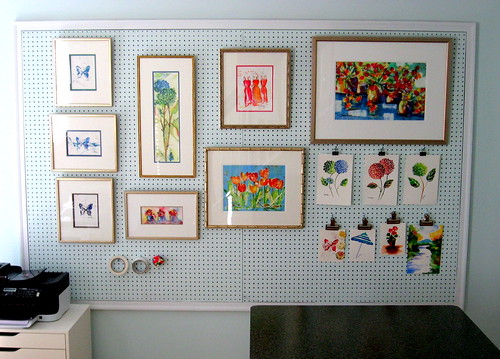
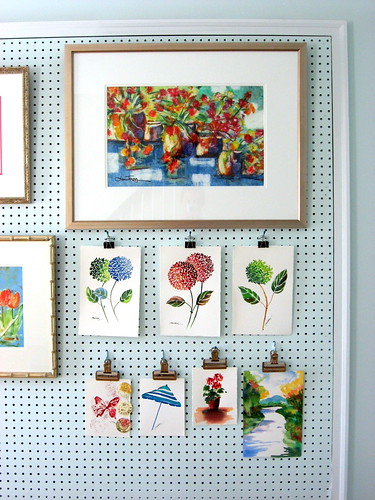
Utilize wall space. As seen here, I built a custom framed pegboard to hang my "works in progress" as well as some of my framed watercolor art paintings.
Art Studio/ Inspiration Board
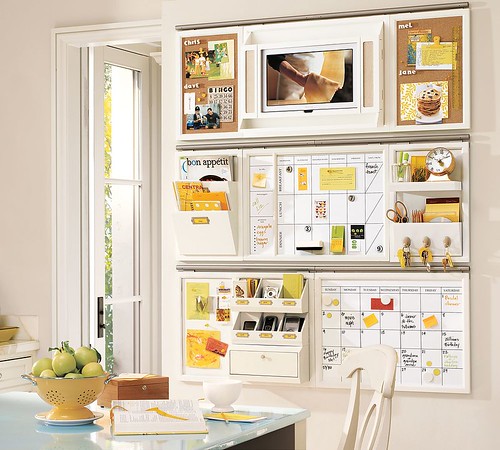
I love the Pottery Barn daily system which keeps me on track. The magnetic/ dry erase board calendar is my favorite piece.
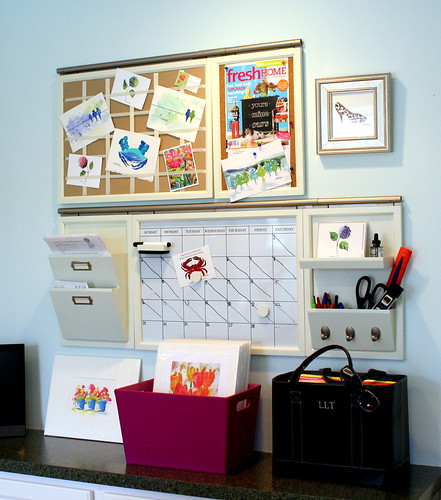
daily system
Here it is in my studio.
Laura <span class=
Beautiful Home Living: Pegboards and Bulletin Boards
Check out this great video from BHG.com for more tips!

More Organization posts and
More ways to follow BB&B

Be sure to download BB&B on your iPhone iPad or iTouch today.
Go to the iTunes App Store and Search: Bright Bold and Beautiful

Labels: , , , ,

Wednesday, March 30, 2011

DIY-Kasse med hjul


God kveld!
Siden vi har lite hyller og oppbevaringsmuligheter i stuen, oppbevarer jeg kokebøker og interiørbøker i en gammel kasse som jeg har satt på hjul på.

Billig, enkelt og stilig...

Labels: ,

Monday, March 28, 2011

Eplemost & Cider


God kveld jenter!
I dag har familien vært på Østfoldbadet i Askim, og da ble det også en tur innom
Anbefalles om du ikke bor så langt unna. Tror vi betaler ca 15 kr flaska når vi kjøper rett fra fabrikken. Veldig koselig er det også, liksom noe gammeldags over det:)

Ha en fortsatt fin kveld og en strålende uke!
Klem fra
Lotta

Labels: ,

Sunday, March 13, 2011

Success Tips: How to Grow your Bamboopink Business

If you are a regular BB&B reader, you are well aware of the launch of Bamboopink! I can hardly contain my excitement! For those of you who have jumped on board, I want to help you grow your team into a successful career. For those of you who are not on board yet, don't delay - this is gong to be huge.
Bamboopink Jewelry by JudeFrances
I have a few key points to share. These tips are not only for Bamboopink.
You can apply these tips to just about any online business.
I have 3 main BFF’s for Success with Bamboopink!

B for Blog ~ F for Facebook ~ F for Flyers to nearby colleges.

Now – I am not telling you to do all three, but you certainly can if you want to jump to the next level.

Blog – I am a watercolor artist and 2 years ago I decided to start a blog to gain exposure on the internet. Today I have over 2100 followers and 2500 subscribers via email. My blog is responsible for 70% of traffic to my online store where I sell my watercolors. And the best part – is that it’s absolutely FREE. You can go to Blogger.com and start a blog within a matter of minutes.

Facebook – it’s free and it works. Networking is the name of the game and there is no faster medium out there. So get on today if you aren’t already.

Flyers to colleges. Every one of you lives close to a college. Print up some flyers that cater to the younger college student. Lead your flyer with “Would you like to earn some extra income?" Drop the flyers off in high traffic areas – library, commons area. The people who use social media are the ones who will succeed in this company, and every college student out there knows what a blog is, has a facebook page, and wants to earn extra money! So get them on board.

Bamboopink Jewelry

Do you realize that we are the ones building this company? We have the power to achieve a lifelong career and form lifelong friendships – I know I have already made a couple friends through this adventure that I will keep in touch with for the rest of my life – be passionate – be strong – be excited - it’s contagious!

Bamboopink Jewelry

"Small opportunities are often the beginning of great enterprises." Demosthenes
Bamboopink turquoise bracelet
Bamboopink Jewelry by JudeFrances
Mo
re ways to follow BB&B

Labels: , , , , ,

Monday, February 28, 2011

Interiør i New York?


Bilder fra tavla på kjøkkenet og Nicholas og meg i NY 2006

God kveld!
Her er det USA feber så det holder. Om bare få dager reiser mannen og jeg til NY og Washington DC. Egentlig skulle vi reise i desember da jeg fyller 30, men pga forskjellige ting reiser vi nå istedenfor. Har vært i NY to ganger tidligere (2004 og 2006). Og det skal sies at jeg ikke var like interessert i interiør den gangen som jeg er nå. Har du forslag til interiørbutikker, markeder osv så blir jeg veldig glad hvis du legger igjen en kommentar under her:)

Ønsker deg som titter innom en herlig kveld!
Jeg nynner videre på Frank Sinatra og Alicia Keys....

Klem fra
Lotta


Labels: , ,

Saturday, February 26, 2011

Bright Finds: Canon EOS Rebel Camera

Today's Bright Find is the Canon EOS Rebel camera. If I could give Etsy Shop owners only 1 tip for success, it would be to "take great photos". If you have a wonderful product, but the photos do not show them well, you will not sell. It's just that simple. It is also just as important as a blogger to capture good quality shots.
canon
Invest in a good quality camera if you are serious about growing your business. I love my Canon because it takes wonderful interior shots even with low lighting.
More Bright Finds and
Mo
re ways to follow BB&B

Labels: , , , , , , , , ,

Wednesday, February 23, 2011

How to Choose a Paint Color

Why is it so hard to choose a paint color for your room? Probably because there are more choices than ever now.
paint color
I put together a list of resources to better help you make your decision.
How to pick paint via Real Simple
Martha Stewart - Choosing a Paint Color
25 things to know about paint via Better Homes and Gardens
More How-To blog posts and More ways to follow BB&B

Labels: , , , , , , , ,